
Feature
Know Your Dive Center’s Real Profit
A full calendar and money in the bank don’t tell you whether the center is profitable. Thalassa builds your profit and loss from the bookings, payments, salaries and costs you already record, so you can see margin and break-even any day of the month.
The problem
Busy isn’t the same as profitable
You find out whether last month made money after a weekend rebuilding numbers in Excel.
Revenue looks good, but nobody has subtracted salaries, pool hire and boat fuel.
You don’t know how many bookings a month you need just to cover your costs.
OTA bookings fill the calendar, but you can’t tell whether they’re worth the commission.
Profit and loss
A live P&L from the work you already do
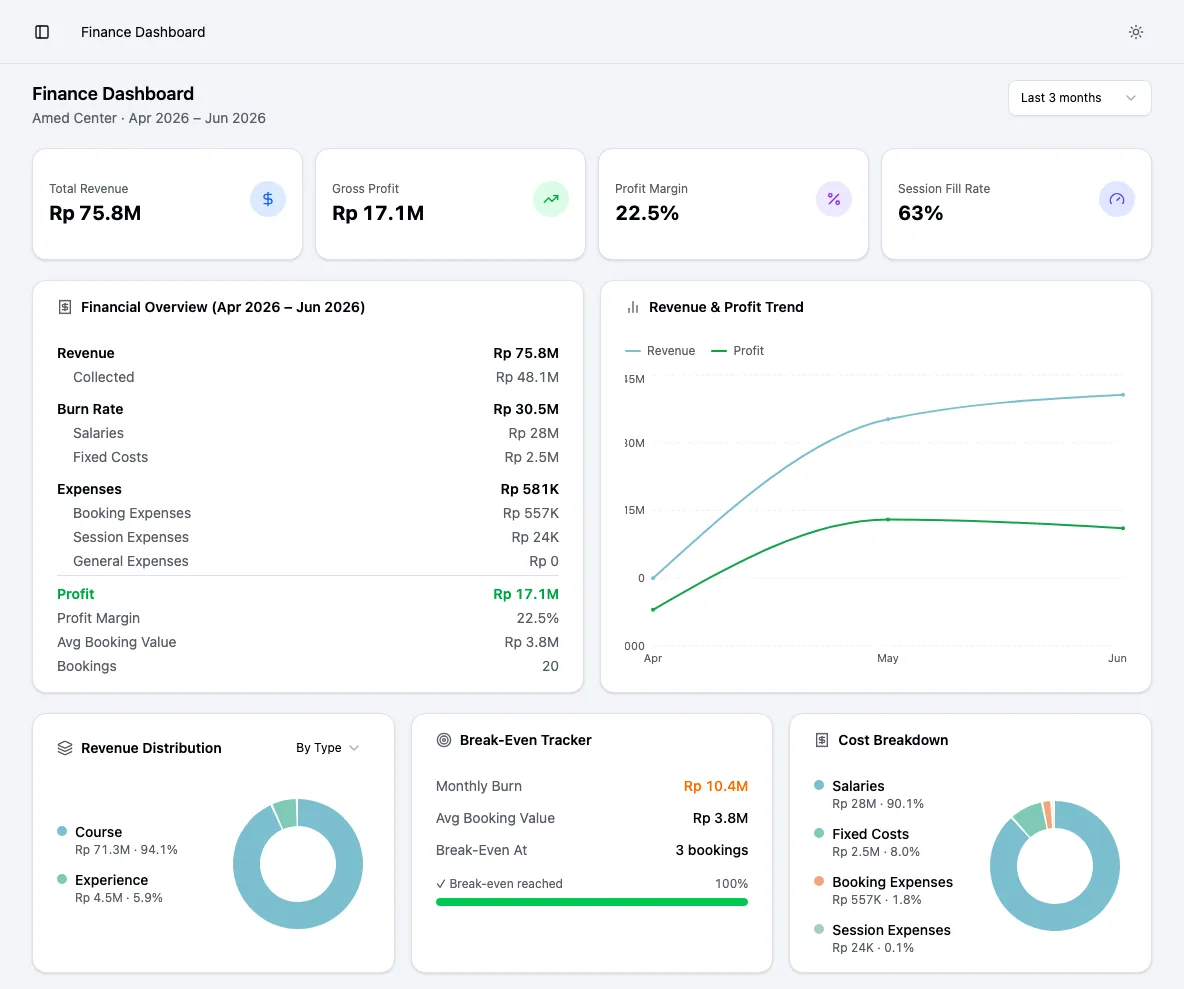
Revenue comes from bookings, with collected payments shown separately so you can see the gap between sold and paid. Costs come from salaries, fixed costs such as rent and pool hire, and expenses logged against a booking, a session or the center in general.
Thalassa turns those into profit and profit margin for any period, compares it with the previous one, and shows the revenue and profit trend month by month.
- Revenue vs. collected revenue
- Salaries, fixed costs and three kinds of expenses
- Profit and margin by period, with comparisons
- Revenue and profit trend chart
Break-even
How many bookings cover your month
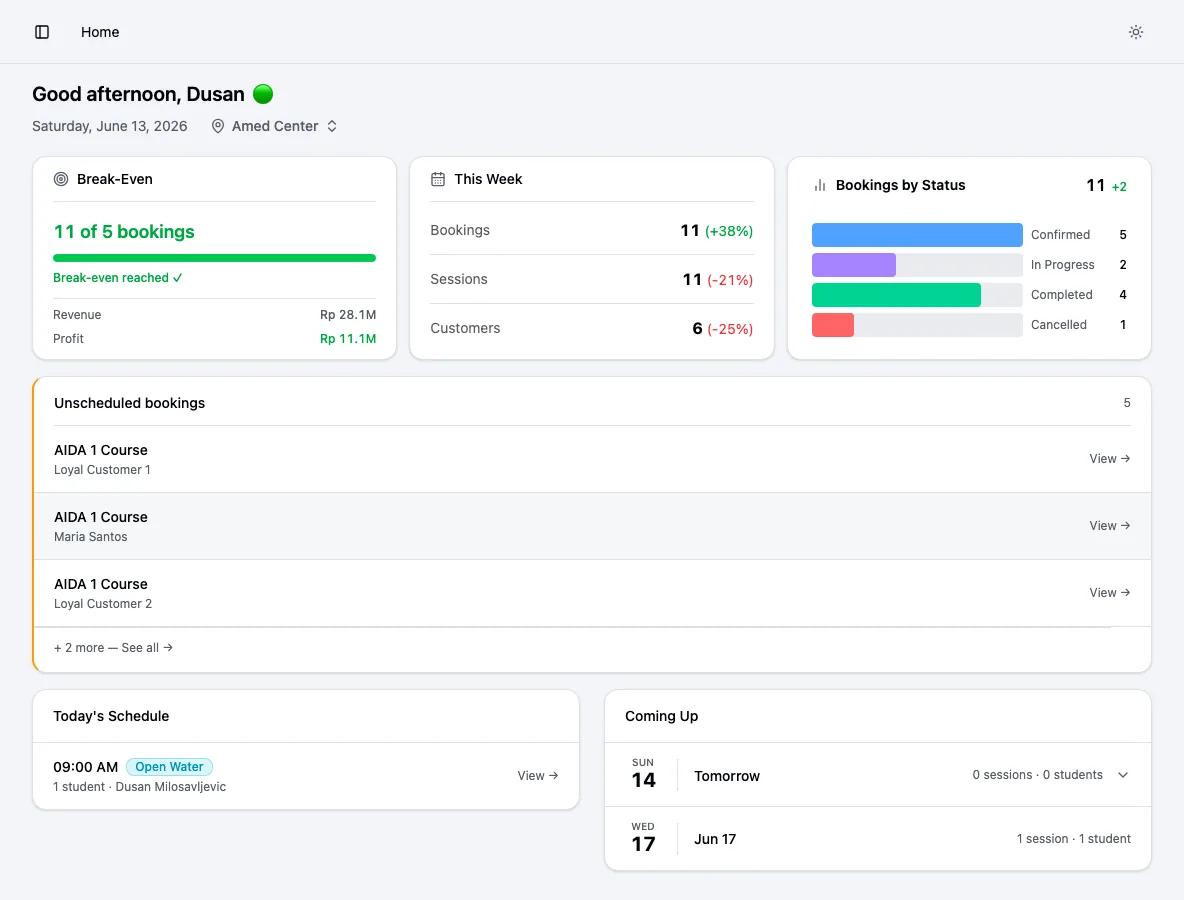
The break-even tracker divides your monthly costs by your average booking value to show how many bookings you need each month to cover them, and how close you are right now. It sits on the owner’s dashboard as well as in finance.
- Monthly burn from salaries and fixed costs
- Average booking value
- Break-even bookings and progress this month
Where the money comes from
Revenue by type and by channel
See revenue split by courses, experiences, rentals and trips, and tag each booking as direct, OTA or partner with its source, such as your website or a named OTA. Combined with per-booking expenses, it becomes clear which products and channels actually pay.
Session fill rate shows how full your sessions are on average, which is often the fastest lever on margin.
- Revenue distribution by package type
- Direct, OTA and partner channels with source
- Average session fill rate
- Cost breakdown chart
Team costs
Salaries tracked, not guessed
Store each team member’s salary history and record salary payments against it. Thalassa shows what has been paid and what is still owed for the month, and salaries flow straight into your burn rate and profit.
- Salary history per team member
- Salary payments and remaining balance
- Included automatically in profit
Further reading
Guides on dive center finances
How to measure the health of your dive center using 12 KPIs
From boat utilization to customer lifetime value, with formulas and worked examples.
Read the guideThe unit economics of a dive center
What each course and customer actually earns you once costs are counted.
Read the guideWhy your dive center is busy but still doesn’t make money
The usual reasons a full season still leaves thin margins.
Read the guidePricing
Founding member pricing
The finance dashboard is included in the founding plan: €500 a year per center, locked in for life.
Pricing detailsFounding member plan
€500 / year
About €42 a month, billed yearly
Your price is locked in for life. It never goes up while you stay subscribed.
Everything included
- Bookings, course packages and per-student session tracking
- Session scheduling, instructor assignment and attendance
- Student records: certifications, medical notes, emergency contacts
- Payments, deposits and outstanding balances per booking
- Finance dashboard: revenue, costs, profit, margin and break-even
- Unlimited staff accounts, students and sessions
- Every new feature we ship, at no extra cost
- Guided setup and a direct line to the founders
No card needed to book a demo. We walk through Thalassa on your own courses and pricing before you decide.
Frequently asked questions
Do I need an accountant to set this up?
No. You enter salaries and fixed costs once, and log expenses as they happen. Thalassa does the maths. It is a management view, not a replacement for your accountant’s books.
Does it connect to my accounting software?
Not yet. Thalassa gives you the operational P&L your accounting software can’t, built from bookings and sessions.
Can I see numbers per center?
Yes. Each center has its own finance dashboard.
Which currencies are supported?
EUR, USD, IDR and MXN today.
Related
Course package tracking
Track how many sessions each student has left in their course or package. Thalassa keeps a session ledger per student, updated from attendance.
Freediving center software
Freediving center software for courses, sessions, students, instructors and profit. Track sessions owed per student and see if your center makes money.
Instructor scheduling
Schedule dive and freediving sessions, assign lead and assistant instructors, and stop double-bookings. Ratio and location warnings built in.
Compare freediving software
A fair 2026 comparison of freediving center software: Thalassa, Manage Freediving, freedivestudio, scuba dive shop software, booking tools and spreadsheets.
See your own numbers in Thalassa
Book a demo and we’ll show you how your bookings, salaries and costs turn into profit and break-even.